- What Is An AI Legal Document Generator? (And How It Actually Works)
- AI Legal Document Generator vs. Lawyer vs. DIY Templates — Real Comparison
- 10 Legal Documents You Can Generate with AI Today
- 1. Non-Disclosure Agreements (NDAs)
- 2. Independent Contractor Agreements
- 3. Service Agreements
- 4. Rental and Lease Agreements
- 5. Last Will and Testament
- 6. Power of Attorney
- 7. Employment Contracts
- 8. Partnership and LLC Operating Agreements
- 9. Affidavits and Sworn Statements
- 10. Demand Letters and Cease & Desist Notices
- Step-by-Step: How to Use Indigo e-Docs to Generate Your First Document
- Legal Accuracy: How Indigo e-Docs Ensures Lawyer-Grade Quality
- Privacy & Security: How Your Data Is Protected
- Free AI Legal Document Generators Compared
- When You Should Still Talk to a Lawyer
- Pricing & Plans
- Frequently Asked Questions
- The Bottom Line
An AI legal document generator can produce a solid first draft of a contract, NDA, or rental agreement in roughly the time it takes to make a cup of coffee. No appointment with an attorney. No $500 retainer. No squinting at a Word template trying to figure out which clauses you can delete.
That’s not marketing BS, that’s the reality of legal tech in 2026. Finally, the technology has reached the point where a well-constructed AI legal document generator will beat most do-it-yourself templates and rival the quality of routine attorney drafting for the overwhelming majority of business documents.
If you’re a freelancer, founder, small business owner, or just someone who needs a legal document right now, this guide covers everything: how the technology works, what you can create, how to choose the right tool, and exactly how to make your first document in 60 seconds.
So, let’s dive in.
What Is An AI Legal Document Generator? (And How It Actually Works)
AI legal document generator is a software that can generate structured legal document drafts from your specific inputs using Natural Language Processing (NLP) and Machine Learning. You answer a few specific questions about your situation, who’s involved, what the deal is, what jurisdiction applies, and the system makes a comprehensive, tailored document in seconds.
Under the hood, it works like this:
-
- Input collection — A guided questionnaire captures your details (parties, terms, jurisdiction, special clauses)
-
- Template matching — The AI selects the appropriate legal framework based on document type
-
- Clause customization — Machine learning models tailor each clause to your inputs using patterns learned from millions of legal documents
-
- Jurisdiction adjustment — Language is adapted to match the laws of your specific state, country, or region
-
- Output generation — A ready-to-sign document is produced in PDF or Word format
The best AI legal document generators, like IndigoEDocs, don’t just fill in blanks. They understand context. If you tell it you’re creating an NDA for a software engineer, it knows to include code and IP-specific clauses. If you specify California jurisdiction, it adjusts non-compete language because California restricts those agreements differently than Texas.
That’s the leap from “template” to “AI legal document generator.” Templates are static. AI is responsive.
AI Legal Document Generator vs. Lawyer vs. DIY Templates — Real Comparison
Let’s be honest about what each option actually delivers:
| Factor | AI Legal Document Generator | Hiring a Lawyer | DIY Templates |
| Cost | $0 – $50/month | $200 – $500/hour | $0 – $40 one-time |
| Time to document | 60 seconds | 2 – 7 business days | 30 – 90 minutes |
| Jurisdiction customization |  Automatic Automatic |
Manual |
 Rarely Rarely |
| Clause-level customization | Yes |
Yes |
Generic |
| Legal accuracy | High (for routine docs) |
Highest |
 Hit or miss Hit or miss |
| Plain-English guidance | Built in |
Depends on lawyer | No |
| Updates with new laws | Continuous |
Yes |
Often outdated |
| Best for | NDAs, contracts, wills, leases, freelance docs | High-stakes deals, litigation, M&A | One-off simple docs |
| Verdict | Best for 80% of business use cases | Best for the 20% that’s complex | Risky compromise |
The smart play? Use an AI legal document generator for routine documents. Use a lawyer for genuinely complex situations (multi-million-dollar deals, regulated industries, litigation). Skip DIY templates entirely — they’re the worst of both worlds.
10 Legal Documents You Can Generate with AI Today
Here’s what a modern AI legal document generator can produce in under a minute:
1. Non-Disclosure Agreements (NDAs)
One-way, mutual, employee, contractor — every NDA variant tailored to your specific confidentiality needs.
2. Independent Contractor Agreements
Full freelance and contractor agreements with payment terms, scope of work, IP assignment, and termination clauses.
3. Service Agreements
For consultants, agencies, and service providers — covering deliverables, timelines, fees, and liability.
4. Rental and Lease Agreements
Residential and commercial leases customized to your jurisdiction’s tenant-landlord laws.
5. Last Will and Testament
Legally precise wills with executor designation, beneficiary allocation, and guardianship clauses.
6. Power of Attorney
General, durable, medical, and limited POAs for various legal and financial situations.
7. Employment Contracts
Offer letters, employment agreements, and termination notices that comply with local labor laws.
8. Partnership and LLC Operating Agreements
Founding documents for partnerships, LLCs, and joint ventures with profit-sharing and dissolution terms.
9. Affidavits and Sworn Statements
Affidavit of identity, lost document, ownership, residency, and more — ready for notarization.
10. Demand Letters and Cease & Desist Notices
Professional legal notices for collections, breaches, and IP infringement.
Those are only the most common ones. The Indigo e-Docs full library has 100+ document types in categories including real estate, business formation, family law, intellectual property and personal legal issues.
Step-by-Step: How to Use Indigo e-Docs to Generate Your First Document
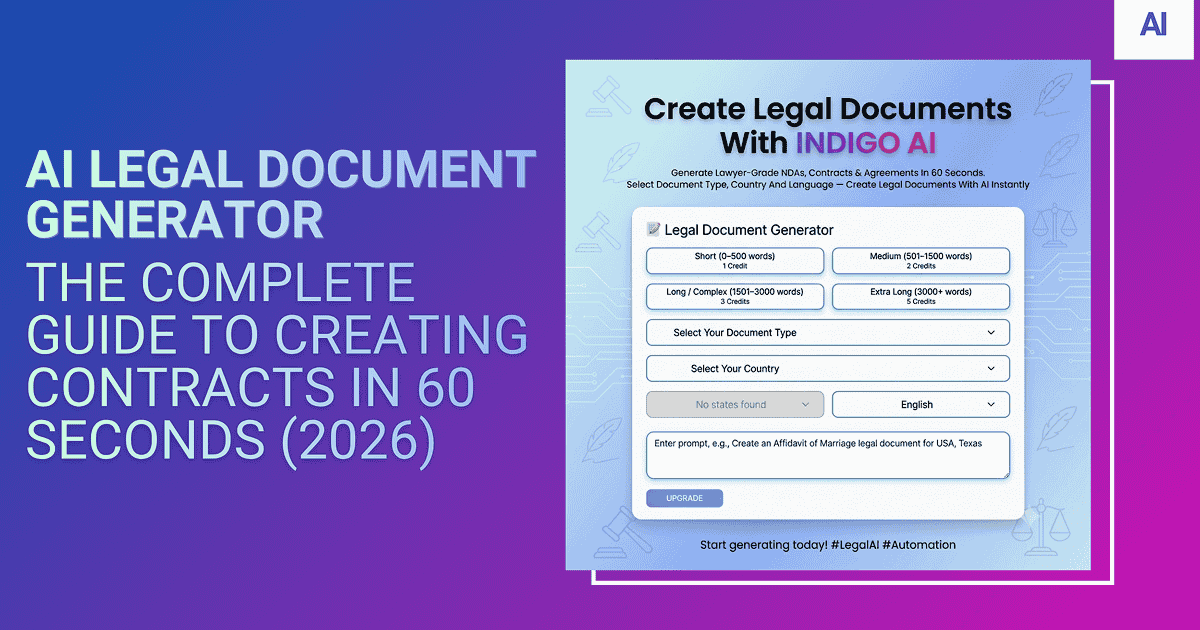
Here’s the exact workflow — designed to be done in 60 seconds, no signup wall, no credit card.
Step 1: Visit IndigoEDocs
Go to indigoedocs.com/create-with-ai/. You’ll see the AI generator front and center. No sign-up required to start.
Step 2: Choose Your Document Type
Pick from a clean menu — NDA, service agreement, rental contract, will, power of attorney, and 100+ others. Search by name or browse by category.
Step 3: Answer the Smart Questions
The AI walks you through a guided form. Typical questions:
-
- Who are the parties involved? (names, addresses, roles)
-
- What’s the scope of the agreement?
-
- Which jurisdiction applies?
-
- Any special clauses or considerations?
This part usually takes 2–3 minutes. The AI skips irrelevant questions based on your earlier answers, so you’re not wasting time on stuff that doesn’t apply.
Step 4: Review the Generated Document
The AI produces a complete document instantly. You see the full draft on screen with:
-
- All your customizations applied
-
- Plain-English explanations of complex clauses (optional toggle)
-
- Highlighted areas for final review
Step 5: Edit and Finalize
Need to tweak something? Edit directly in the browser. Want to add a custom clause? The AI assistant can help you draft it on the fly.
Step 6: Download
Export as PDF, Word, or both. Most users prefer PDF for sending and Word for further editing.
Step 7: Get It Signed (Optional but Recommended)
Send for e-signature through a compliant platform like IndigoESign. Your recipient signs from anywhere, you both get a fully executed copy with full audit trail.
That’s it. Start to signed in roughly 15 minutes total — including the back-and-forth with the other party.
Legal Accuracy: How Indigo e-Docs Approaches Quality and Its Limits
This is the question that matters most. Can I actually trust the output of an AI legal document generator?
Here’s what separates a serious platform from a glorified template generator:
1. Trained on Verified Legal Documents
Indigo e-Docs is trained on a body of legal documents professionally drafted—not random web scraping. The training data comes from licensed legal databases, peer-reviewed forms libraries, and current statutory language.
2. Jurisdiction-Aware Logic
The system knows California, New York, Delaware and Texas have different rules. Same with India, UK, Canada and Australia. Depending on where you are, it changes clauses, terminology and what you need.
3. Continuous Legal Updates
Laws change. The Indigo e-Docs system is updated as new statutes, court rulings, and regulatory changes affect document requirements. Static templates can’t do this.
4. Built-In Compliance Checks
Before you download, the system checks to make sure all the required ingredients for it to be legally binding in your state are present – offer, acceptance, consideration, mutual intent, proper formatting and any state-specific requirements.
5. Pairing With AI Analysis
For extra confidence, you can run the generated document through the AI document analyzer to double-check for missing clauses, vague language, or risk flags. Two AIs auditing each other’s work is a very strong safety net.
The honest caveat: AI legal document generators are good for routine, run-of-the-mill business documents. If it’s really complicated – M&A across multiple jurisdictions, litigation strategy, regulated industries – then get a lawyer. But for the 80% of documents most people need, the accuracy is really lawyery-grade.
Privacy & Security: How Your Data Is Protected
You’re feeding sensitive information into this tool — names, financial details, business secrets. The privacy question matters.
Here’s what Indigo e-Docs does to protect your data:
-
- End-to-end encryption — All data is encrypted in transit and at rest using AES-256 encryption
-
- No third-party sharing — Your document data is never sold, shared, or used to train external AI models
-
- Optional anonymous mode — Generate documents without creating an account; nothing is stored after download
-
- GDPR and CCPA compliant — Full compliance with global data protection regulations
-
- SOC 2 Type II framework — Enterprise-grade security infrastructure
-
- Auto-deletion options — Set documents to auto-delete from servers after a defined period
This matters because some “free” AI legal tools harvest your inputs to train their models or sell to advertisers. Always read the privacy policy. With IndigoEDocs, the answer is simple: your data is yours.
Free AI Legal Document Generators Compared
There are several players in the space. Here’s an honest comparison of the major options:
| Platform | Free Tier | Document Library | Jurisdiction Coverage | E-signature | Best For |
| IndigoEDocs | Full free tier |
100+ document types | Global (US, UK, India, Canada, AU) | Integrated |
All-around best for individuals and SMBs |
| LegalZoom | Paid only |
Limited free templates | Primarily US | Paid add-on |
Established brand, higher cost |
| Rocket Lawyer | 7-day trial |
Strong template library | US-focused | Included with subscription |
Subscription-heavy model |
| Template.net | Basic free |
Generic templates | Generic | Not included |
Quick one-off templates |
| Spellbook | Paid only |
Word add-in for lawyers | Customizable | Via Word |
Law firms and legal pros |
Indigo e-Docs strengths:
-
- Actual free tier (not a trial)
-
- Best Free Document Libraries
-
- Multi-jurisdiction support built-in
-
- Built-in AI analyzer to verify documents
-
- No account needed to start earning
Where to go for alternatives:
-
- Microsoft Word integration for law firms, with Spellbook
-
- Need US-only formation services specifically → LegalZoom
-
- Or, if you want a well established brand and don’t mind paying → Rocket Lawyer
Many freelancers, founders and small businesses will find Indigo e-Docs offers the best combination of accuracy, ease of access and no cost barrier.
When You Should Still Talk to a Lawyer
I’ll keep it real with you — an AI legal document generator isn’t a magic wand. Here’s when you still need human eyes:
-
- High-value transactions (six figures or more)
-
- M&A and complex business deals
-
- Cross-border contracts with multiple jurisdictions
-
- Litigation or active disputes
-
- Highly regulated industries (healthcare, financial services, pharma)
-
- Unique deal structures that don’t follow standard templates
Use AI to write the first draft. Then have a lawyer read it. You’ll save 60-80% on legal fees as the heavy lifting is done.
For day-to-day business documents — NDAs, freelance contracts, rental agreements, service deals, simple wills, basic POAs — you really only need an AI legal document generator.
Pricing & Plans
The vast majority of what most people need is free with IndigoEDocs. Premium plans unlock:
-
- Unlimited document generation
-
- Advanced AI analyzer features
-
- Priority e-signature processing
-
- Team accounts and collaboration
-
- Custom branding on generated documents
-
- API access for enterprise integrations
For solo users and freelancers, the free tier covers 95% of typical needs. Power users and businesses tend to upgrade for unlimited generation and team features.
Frequently Asked Questions
A: Yes, if it’s done right. If it has the essential legal elements ( offer , acceptance , consideration , mutual intent ) and has been properly signed , it is just as enforceable as a doc drafted by a lawyer . The method of drafting does not affect the validity.
A: The free tier is genuinely free. You can generate, edit, and download documents without paying. Premium plans add features like unlimited generation, advanced analyzer tools, and team accounts — but core functionality is free.
A: No. These are tools for non-lawyers.” The questions are in plain English, the guidance tells you what each clause means and the output is a complete ready-to-use document. No legal background needed.
A: Yes. Every document is fully editable. You can modify clauses, add custom sections, change parties, or adjust terms — either through the AI assistant or by directly editing the document text.
A. A template is static — same words, same clauses, same structure, regardless of who you are. A legal document generator is dynamic – it customizes the entire document to your specific circumstances, jurisdiction, and needs. Templates are a starting point; AI generators are finished goods.
A: Yes, if the platform supports multiple jurisdictions. Indigo e-Docs handles US, UK, India, Canada, Australia, and several EU countries. For cross-border deals, specify the governing law and jurisdiction during generation, and the AI adjusts language accordingly.
The Bottom Line
An AI legal document generator is one of the most useful tools to come out of the AI boom for the everyday business owners. Legally sound contracts in seconds. Save hundreds in attorney fees. Go into every deal knowing your paperwork is solid.
The technology has been finally catching up to the promise. Now, for routine business documents, AI produces work that is on par with or better than what most attorneys would produce for the same use case — at zero cost and in 1/1000th of the time.
Ready to create your first document?
Try the Indigo e-Docs AI Legal Document Generator and have a polished draft in 60 seconds, free to start. Keep the no-signup wall. Just type, customize, and download.
If you’ve already got a document and want it analyzed for risks or missing clauses, head to the AI Document Analyzer — same technology, applied in reverse.
The future of legal documents is not sketchy templates, nor is it expensive law firms. It’s accurate, accessible AI designed for how real people really work.